
Fabric Simplified: OneLake, mirroring and shortcuts

One place for your data. Two simpler ways to connect it.
In our last article, we explored why organisations are moving to Microsoft Fabric. The TL;DR? Most data environments have become more complicated than they need to be, and Fabric provides a more connected foundation for analytics.
In this series, we’ll break Fabric down piece by piece, explain what each component does, and more importantly, why it matters.
But before diving into workloads like Data Factory, Real-Time Intelligence or Power BI, it’s worth understanding the layer that sits underneath all of them: OneLake.
Because regardless of what you’re building in Fabric, it all starts there.
OneLake: a shared data layer for the organisation
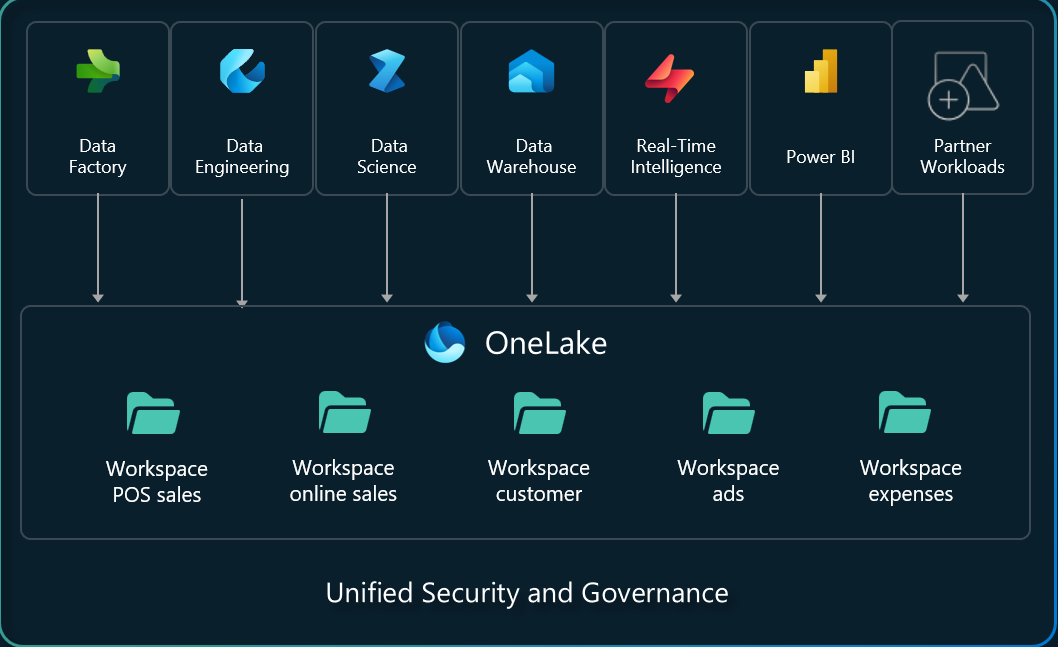
Every Microsoft Fabric tenant comes with a single OneLake by default.
Not one for each project. Not one for each team or department. One for the entire organisation.
Microsoft often compares OneLake to OneDrive, and it’s a useful comparison. Nobody creates a brand-new storage system every time someone needs to save a file. The storage layer already exists, and different teams organise and work within their own areas of it.
OneLake applies the same principle to analytics and data. Rather than creating separate storage layers for different tools, Fabric provides a common place for data to live. Finance, operations, sales and analytics teams can work from the same underlying platform while maintaining their own workspaces and permissions, helping prevent the silos that often develop as different teams adopt different tools and platforms.
It sounds simple, and that’s partly the point. Many organisations spend years dealing with duplicated datasets, disconnected reporting solutions and competing versions of the truth. OneLake doesn’t solve every data problem overnight, but it does provide a shared foundation that helps reduce those issues.
Why open formats matter
A key thing to note is that data in OneLake is also held in an open format (Delta and Parquet). That might sound like a technical detail, but it matters. Your data isn’t tied to a single bespoke tool or locked into a structure that only one platform understands.
Instead, the same data can be accessed by warehouses, lakehouses, notebooks, Power BI reports, AI solutions and other Fabric workloads without constantly moving or duplicating it.
That’s useful for two reasons: it reduces complexity, but it also gives organisations more flexibility over time.
We all know how quickly technology can change and platforms can evolve. Keeping data in open formats makes it easier to adapt without having to rebuild everything from scratch.
Security that travels with the data
A common challenge in analytics platforms is maintaining consistent security across multiple tools.
Fabric takes a more centralised approach. Most day-to-day access is managed through workspaces, which determine who can see reports, datasets and development environments. Underneath that, OneLake provides a consistent security model across the platform.
This means organisations can define access rules once rather than recreating them separately across multiple tools and services. Access can be controlled at multiple levels, including:
- Folders
- Tables
- Columns
- Individual rows of data
The benefit is simple. Security rules don’t need to be recreated over and over again in different places. The same rules continue to apply regardless of how the data is accessed.
Authentication is tied directly to Microsoft Entra ID, while sensitivity labels remain attached to the data wherever it is used. Security becomes part of the data architecture rather than something bolted on later.
But what about the data you already have?
This is where many data projects become difficult, as very few organisations are starting with a blank sheet of paper.
Most already have data spread across databases, cloud platforms, storage accounts, applications and third-party systems. Some of those systems may have been around for years, and others may have arrived after acquisitions or changing business requirements. Realistically, moving everything into a new platform before delivering any useful insight would be a tough sell.
Microsoft recognised that reality and included shortcuts and mirroring. Together, they’re Microsoft’s answer to a problem many organisations know all too well: how do you create a unified data platform when your data already lives everywhere?
Shortcuts: access data where it already lives
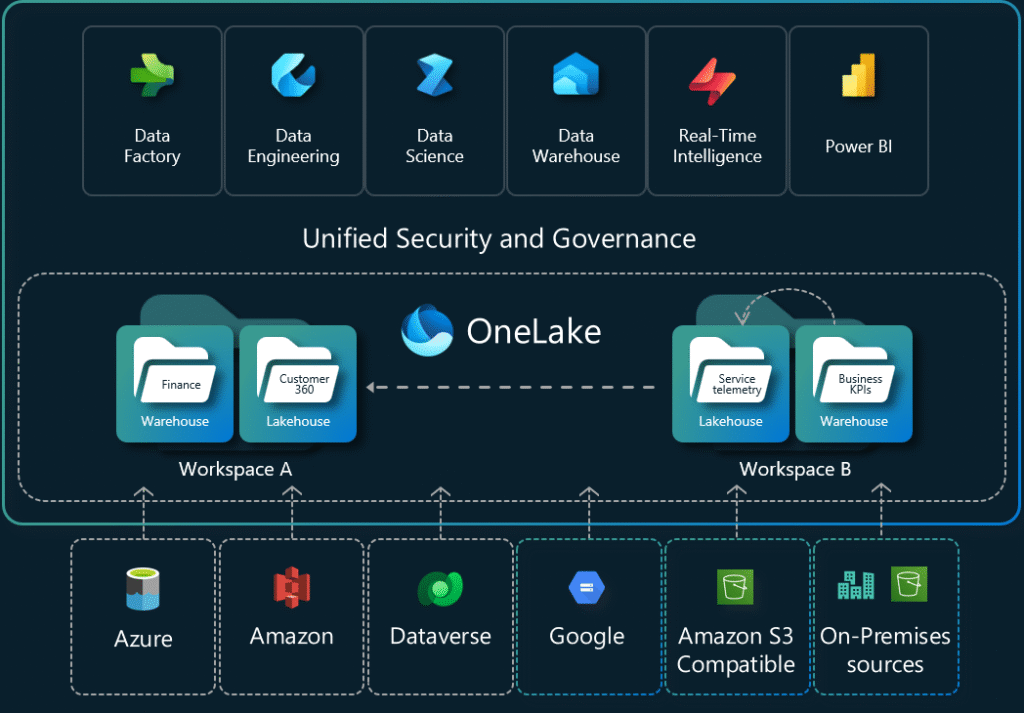
A shortcut is exactly what the name suggests. Rather than moving or copying data into OneLake, Fabric creates a reference to data that already exists somewhere else. The source data remains where it is, but it appears inside Fabric as though it is part of your data estate.
If you’ve ever used a desktop shortcut or linked folder, the concept is very similar.
Shortcuts can connect to:
- Other Fabric locations
- OneLake
- Amazon S3
- Google Cloud Storage
- SharePoint
- Dataverse
- Various other supported sources
In many cases, it’s the fastest route to making data available for reporting, analytics and AI without creating additional copies.
It allows organisations to bring data from multiple systems and even multiple clouds together in a single workspace while continuing to manage the original data in its existing location.
Mirroring: bring data into OneLake and keep it synchronised
Mirroring takes a different approach. Instead of pointing to existing data where it lives, Fabric brings a copy of the data into OneLake and automatically keeps it synchronised with the source system.
As changes happen in the source database, those changes are replicated automatically, without custom replication processes, scheduled refresh jobs and integration pipelines. The mirrored data also remains read-only, so nobody can change your source data by accident through Fabric.
This approach is particularly useful for operational databases where you want analytics workloads running against a local copy rather than directly against a live production system. This also works well to access data that lives on-premises or in hard-to-access third-party systems (once the necessary configuration is done by the vendor).
Fabric currently supports mirroring across a range of common platforms, including Azure SQL, SQL Server, Cosmos DB, Snowflake, PostgreSQL and Oracle. And if you have data in an unsupported format, you can use Open Mirroring and build custom integrations using the parquet file structure to bring that data into Fabric.
So, which one should you use?
Both solve the same challenge: making external data available in Fabric without a complex rebuild. The difference is where the data lives.
Use a shortcut when:
- The source system is already accessible and performs well
- You want to avoid creating duplicate copies of data
- Data is distrubuted across different platforms or cloud providers
- Fast access is more important than centralising storage
Use mirroring when:
- You want a local copy for your organisation inside OneLake
- The source is a live operational database
- Analytics workloads should be seperated from production systems
- The source sits behind network or infrastructure boundaries
- You want Fabric to manage synchronisation automatically
There’s no universally correct answer. Once the data is available through OneLake, the wider Fabric platform can work with it regardless of how it arrived there.
What this means in practice
OneLake provides the foundation. It gives organisations a single place to organise, govern and work with their data. Shortcuts and mirroring then make it possible to bring existing data into that ecosystem without having to redesign every system or migrate everything on day one. Every Fabric workload sits on top of this foundation, and the result is a more connected data estate, less duplication, and a simpler path towards reporting, data engineering, real-time analytics or AI.
Most importantly, it allows organisations to focus less on moving data around and more on getting value from it.
Why Quorum
Technology is only part of the challenge, and usually the easy part. Understanding how people, processes and data fit together is where most of the real work happens.
Some organisations come to Fabric because they’re supporting multiple reporting platforms. Others are struggling with duplicated datasets and inconsistent governance. Some simply want a clearer, more sustainable approach to managing data.
At Quorum, we help organisations understand where they are today, identify opportunities to simplify their data landscape, and build practical roadmaps for adopting Microsoft Fabric. That means looking beyond the technology itself, but also focusing on governance, architecture, reporting requirements and business outcomes.
The goal isn’t to deploy Fabric for the sake of it. It’s to create a data foundation that people trust, understand and actually use.
AWARDS & RECOGNITION

FOLLOW US
CONTACT INFO
CONTACT INFO
Quorum
18 Greenside Lane Edinburgh
UK EH1 3AH
Phone: +44 131 652 3954
Email: marketing@quorum.co.uk
FOLLOW US
AWARDS & RECOGNITION